In PLG, paywalls are not just monetization mechanics.
They are product experience design, with a revenue outcome.
A great paywall does two things at the same time:
- It helps the customer understand value.
- It creates the right moment of urgency to upgrade.
Many teams treat paywalls like a pricing page problem. In reality, paywalls live inside the product, so user experience matters just as much.
The 2 Types of Paywalls in PLG
1) Hard paywalls
Hard paywalls provide no trial usage. The feature is completely gated behind the paywall.
The most common hard paywalls are security and admin features, such as:
- SSO
- Advanced access controls
- Enterprise-level permissions
These features usually do not require trial usage for customers to understand the value. If a buyer needs SSO, they already know.
So there is little benefit to giving "free samples."
2) Soft paywalls
Soft paywalls provide some trial usage in Free or lower tiers.
Soft paywalls typically show up in three forms:
A) Total quantity limits
Example: Zoom provides a limited number of Whiteboards in Free and the lowest paid plan.
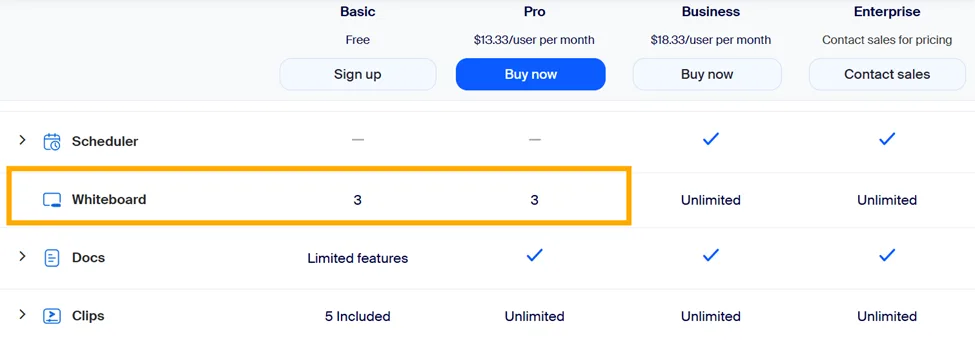
This model works well when users gain value by keeping objects over time (for example, a whiteboard they revisit and share with teammates), but unlimited creation would remove the upgrade motivation.
B) Recurring usage
Example: Figma provides recurring AI credits.
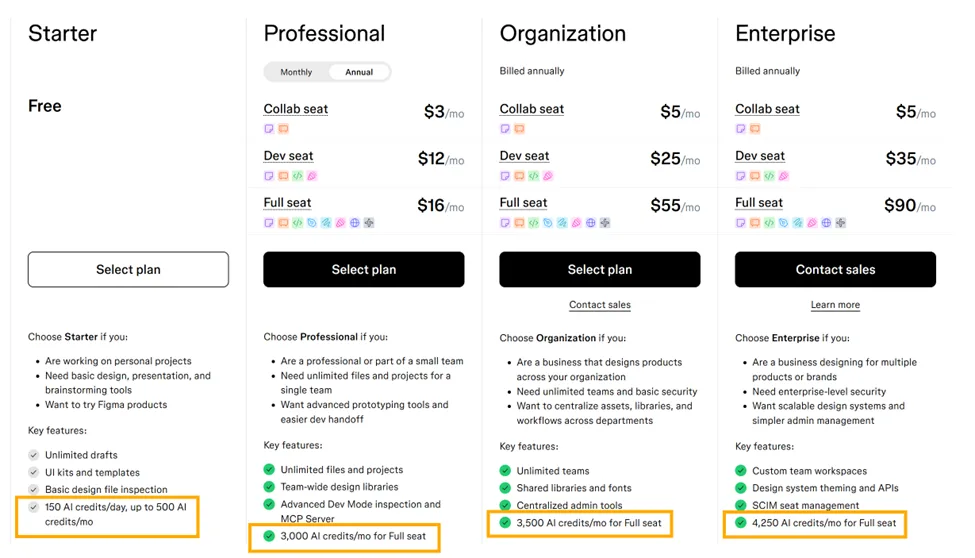
This model works best when the feature is part of a continuous workflow and customers need time to build habit.
C) One-time usage
Example: ClickUp offers a limited number of one-time uses for Timeline View in Free and the lowest paid plan.
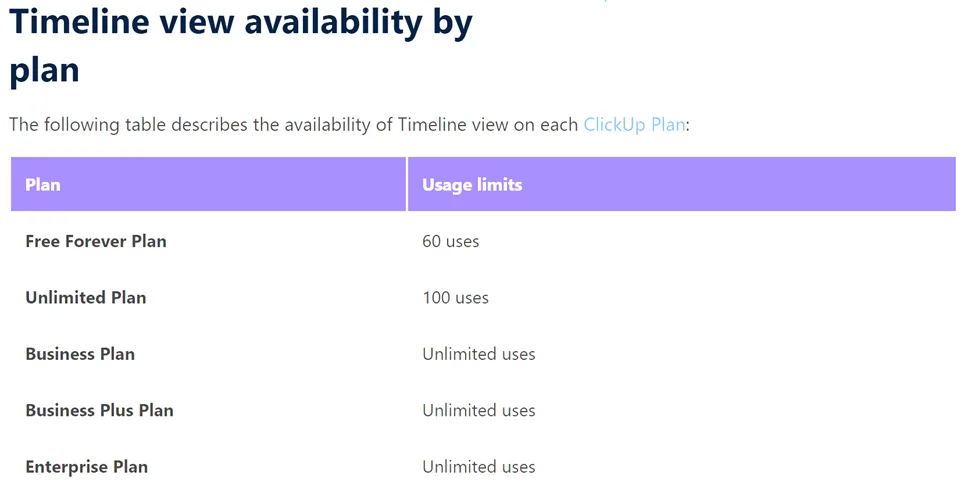
This model is effective when the feature has a "wow moment" and you want customers to experience it quickly, but not rely on it indefinitely.
The Real Question: How Much Trial Usage Should You Give?
The most reliable way to answer this question is through paywall performance analysis.
If your paywall is designed to help customers see value, you should be able to measure whether it is doing its job.
The 4 Metrics That Tell You if a Paywall Works
For each paywall, track:
- Paywall trigger rate: how often users hit it
- Paywall conversion rate: how often users upgrade after hitting it
- Time to convert: how long it takes to hit the paywall, and then convert after the paywall is triggered
- Downstream impact: overall conversion and expansion, not just the one feature
Once you have these metrics, you can stop debating paywalls philosophically and start managing them like a revenue system.
The Paywall 2×2: What to Do With Each Paywall Type
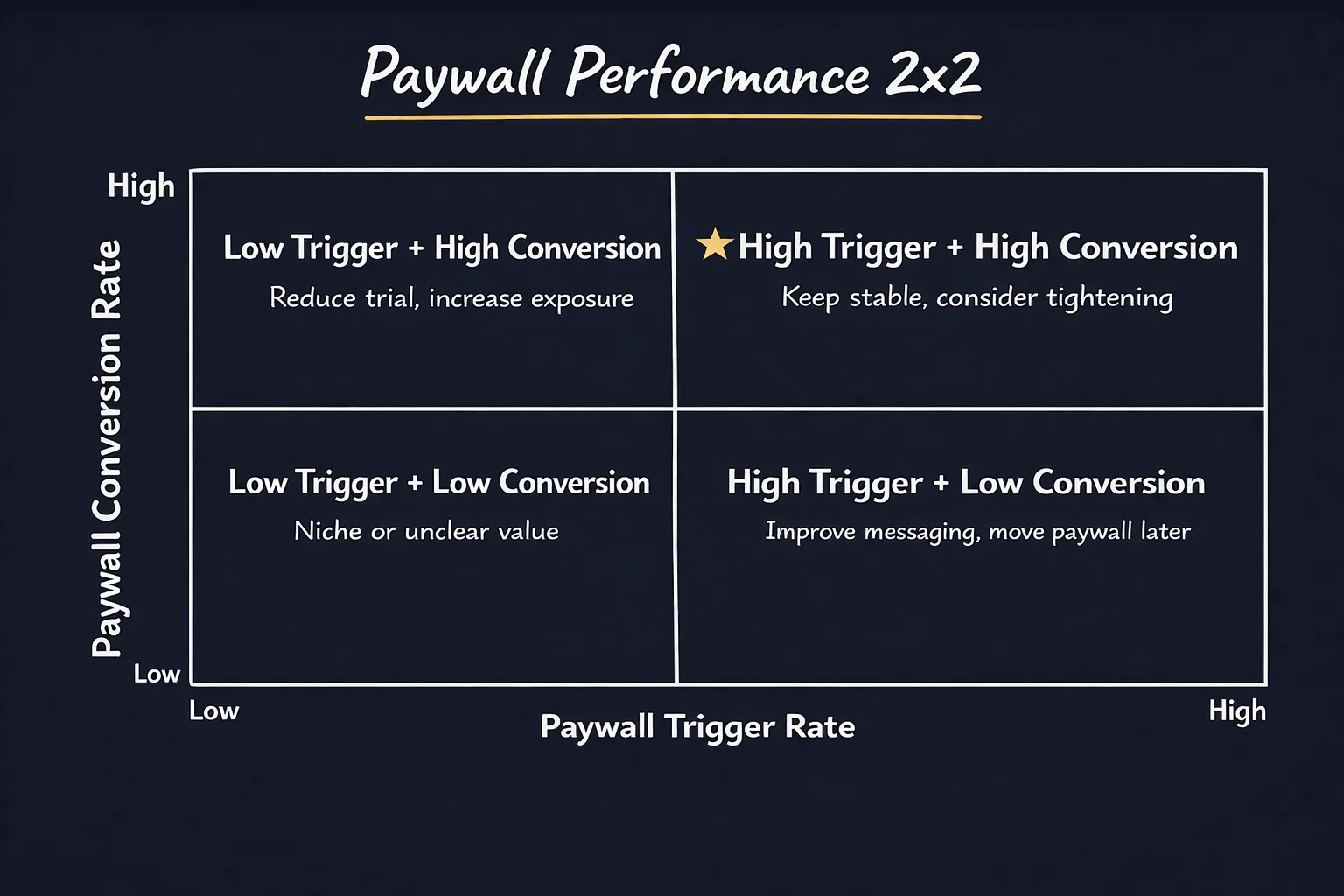
1) High trigger rate + high conversion rate
These are high-performing paywalls.
Users hit them often, and when they do, they understand the value and upgrade.
Action:
- Review time to convert
- Consider reducing usage slightly to accelerate conversion
- Otherwise, keep it stable
2) Low trigger rate + high conversion rate
These paywalls do not trigger often, but when they do, users convert.
That usually means the feature is valuable, but too few users are reaching the paywall moment.
Action:
- Reduce trial usage so the paywall triggers more often
- Increase exposure so more users discover and use the feature
3) Low trigger rate + low conversion rate
These paywalls rarely trigger, and when they do, users do not upgrade.
This category often includes niche features. For example, a specific CRM integration might be useful only for a small subset of customers.
Action:
- Investigate the "why" before changing anything
- Validate whether this is truly a monetization lever or simply a segmentation feature
- In many cases, the right outcome is to confirm the feature is correctly targeted, not to optimize conversion
4) High trigger rate + low conversion rate
This category often has the most opportunity, because users are clearly engaging but have not connected the value to an upgrade yet.
Users hit the paywall often, but do not upgrade. That means:
- the feature is getting used
- the paywall moment is happening
- but users do not see enough value to justify paying
This is often a value communication problem.
Action:
- Increase trial usage so users can experience more of the feature before being blocked
- Improve the paywall UI (copy, screenshots, GIFs, examples) to communicate the capabilities
- Consider triggering the paywall later in the workflow, after users have experienced more value
A/B Test Your Paywall Experiments
Paywall changes create second-order effects.
When you tighten one paywall, you might:
- increase conversion on that feature
- but reduce engagement
- and accidentally decrease overall conversion
If you only measure the paywall itself, you might optimize locally and miss the full business impact.
So when you run paywall experiments, measure:
- the target paywall trigger and conversion
- overall plan conversion
- downstream expansion
Final Thought: Paywalls Are Part of the Product
The best PLG companies treat paywalls as part of user experience design.
Every paywall should be built around one question: How do we want customers to experience this feature so they can understand its value?
Trial usage is only one part of the answer.
The other part is the paywall itself:
- clear explanation
- strong UI (images, text, or GIFs)
- a concrete "why this matters" message
In PLG, the paywall is the conversion moment.